> For the complete documentation index, see [llms.txt](https://docs.zerolend.xyz/llms.txt). Markdown versions of documentation pages are available by appending `.md` to page URLs; this page is available as [Markdown](https://docs.zerolend.xyz/features/capital-efficiency/credit-delegation.md).
# Credit Delegation
This page discusses ZeroLend’s credit delegation feature.
Credit Delegation is a feature that allows a depositor to deposit funds into ZeroLend to earn interest while delegating borrowing power (credit) to other users. The loan terms are agreed upon between the depositor and borrowers on-chain via smart contracts. This feature facilitates extra yield for the depositor and provides uncollateralized loan access for borrowers.
## Key points to remember while using credit delegation on ZeroLend
* Depositors (delegators) earn additional yield on top of the protocol's standard yield.
* Borrowers (delegatees) gain access to uncollateralized loans.
* The borrower must align with the depositor's eMode category.
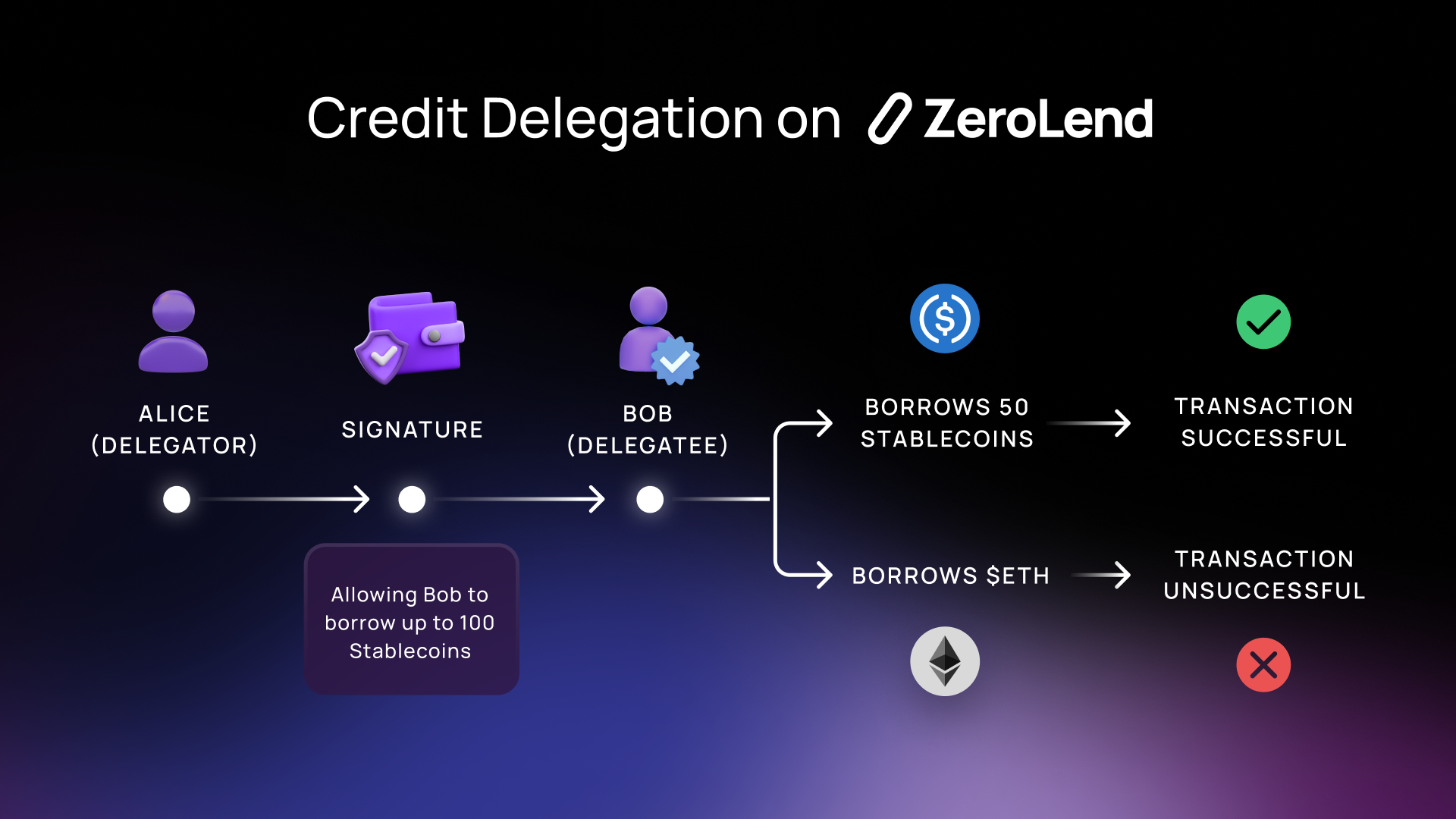
Example: If a depositor's eMode category is STABLECOINS, then the delegatee can only borrow assets in that category. Borrowing outside this category, like $wETH, would result in a failed transaction.
* Delegatees cannot exploit credit approval to liquidate the delegator.
* The loan will not be processed if a borrow puts the delegator's position below the liquidation threshold.
Example: Suppose Alice deposits stablecoins into the protocol, delegates borrowing power to Bob, and agrees that Bob can borrow up to 100 stablecoins. Alice approved this credit. Later, Bob accessed Alice's available credit. If Bob tries to borrow in a non-stablecoin category, the transaction fails.
---
# Agent Instructions
This documentation is published with GitBook. GitBook is the documentation platform designed so that both humans and AI agents can read, navigate, and reason over technical content effectively. Learn more at gitbook.com.
## Querying This Documentation
If you need additional information that is not directly available in this page, you can query the documentation dynamically by asking a question.
Perform an HTTP GET request on the current page URL with the `ask` query parameter, and the optional `goal` query parameter:
```
GET https://docs.zerolend.xyz/features/capital-efficiency/credit-delegation.md?ask=&goal=
```
`ask` is the immediate question: it should be specific, self-contained, and written in natural language.
`goal` is optional and describes the broader end goal you are ultimately trying to accomplish on behalf of the user. GitBook uses it to tailor the answer towards what is most useful for that goal.
The response will contain a direct answer to the question and relevant excerpts and sources from the documentation.
Use this mechanism when the answer is not explicitly present in the current page, you need clarification or additional context, or you want to retrieve related documentation sections.